Steady State Growth Regulation
Persistent Identifier
Use this permanent link to cite or share this Morpheus model:
How to stop tissue growth at a specific size?
Introduction
The growth and regeneration of organisms into complex shapes remains largly an open question. This model page presents the reproduction of a theoretical study of Kaity et al. where cell growth is mediated by morphogens. The original model is a lattice free, center based model where cells are modeled as 2D spheres. Cell growth/shrinkage is a function of the intracellular morphogen concentration and the neighbor count. When cells are growing to twice their initial size, they divide; when they shrink to half their original size, they go into apoptosis. This growth mechanism depends on a growth agent, whose concentration is governed by a diffusion equation. Diffusion is approximated as a rate equation, that is, a concentration balance between cells and their neighbors. In combination, this leads to growth alongside the patterns emerging from the diffusion of the morphogen.
On this model page, we present the equilibrium radial growth by two different models. The first model has a single producer cell at the center, which produces morphogen at a constant rate. The morphogen then diffuses to the edges of the cell sphere. The second model has no dedicated producer cell, instead the cells contain a Schnakenberg reaction diffusion system. The parameters are calibrated such that the Turing pattern resulting from the reaction diffusion system is a spot of high activator concentration. When the simulation is run long enough, this leads to a similar equilibrium growth.
Description
Constant Production Equilibrium Growth
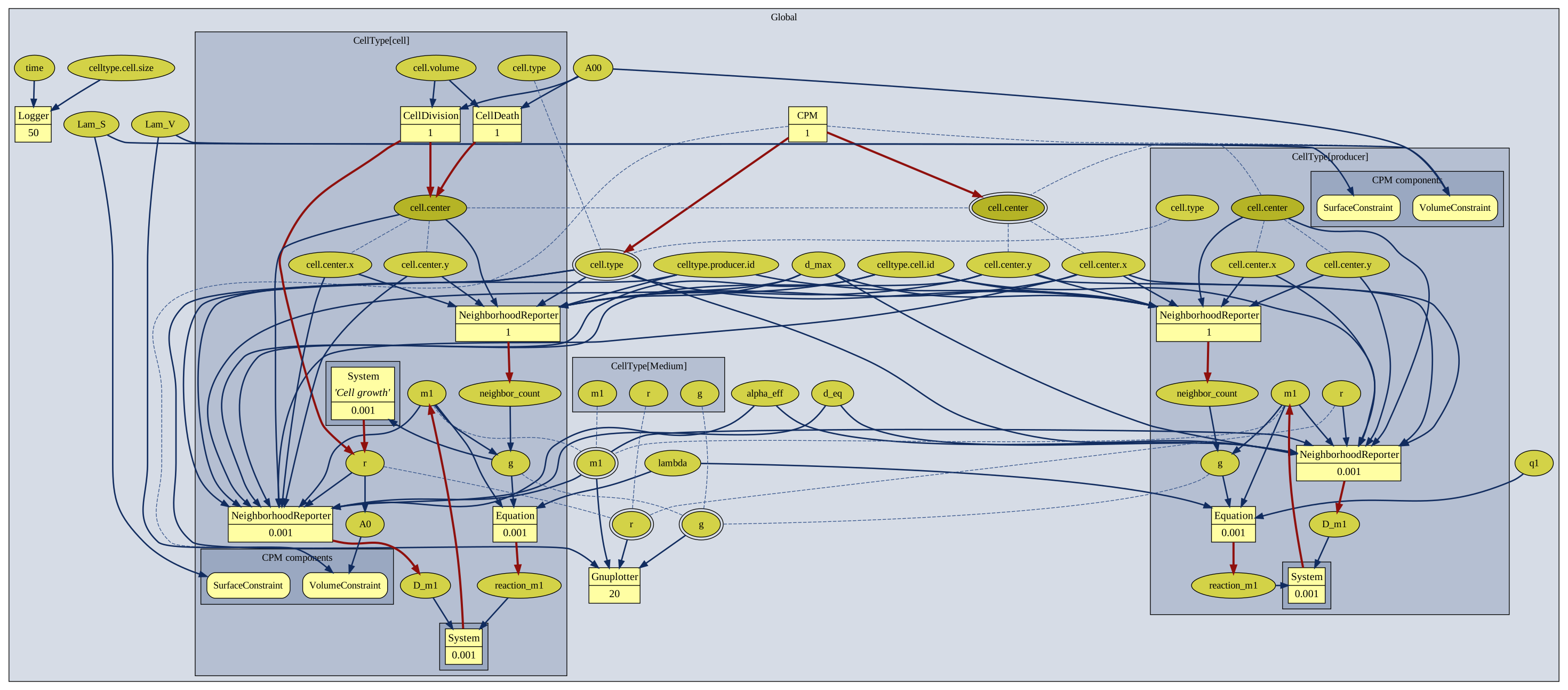
In contrast to the original publication, our model is lattice based. Thus, we define a global cell size and adjust our parameters according to this. The model contains two cell types: producer cell and normal growth cells. In producer cells, the growth mechanism is shut off (that is, the $r$ parameter is a constant) and it contains a production term ($q$). The normal cells function as described in the introduction of Kaity et al., and their production term $q$ is 0.
Schnakenberg Equilibrium Growth
Instead of relying on producer cells, the Schnakenberg growth model implements a reaction system with an activator and an inhibitor morphogen, resulting in the emergence of a Turing pattern. In this case, the pattern is a simple sphere of high activator concentration. The activator functions as the input for the growth mechanism.
Results
Constant Production Equilibrium Growth
We initialize with a production cell in the center and a normal cell next to it. Due to the constant production of morphogen, the normal cell starts to divide and the tissue grows until the equilibrium state is reached. In Figure 1, we present a comparison to the original results.
: [**Kaity *et al.***](#reference), [Fig. 2A](https://www.sciencedirect.com/science/article/pii/S0022519325003388?via%3Dihub#f0010))](/media/model/m5932/m5932_producer_steady_state_hubf80323c8a9b4cabe3bb5c6e4dc098d1_4333483_1c9f07048c567c83ec7cd29785cc94ba.png)
simple_equilibrium_rate_main.xml)
When we compare the resulting cell count from the original publication to ours, we observe the saturation cell count to be similar, see Figure 2.
: [**Kaity *et al.***](#reference), [Fig. 3A](https://www.sciencedirect.com/science/article/pii/S0022519325003388?via%3Dihub#f0015))](/media/model/m5932/cell_count_comparison_hu0a1ef993adc50c9b496600ca20250db2_204758_bff18d6dff16d39d9a45d63cca9f9f03.png)
Schnakenberg Equilibrium Growth
We initialize a single cell in the center with a moderate concentration of both activator and inhibitor. In order to have a single spot emerge, we increase the growth speed in the beginning – otherwise, the initial randomness of the cell divisions would lead to the emergence of multiple spots. Once the tissue is large enough to incorporate the Turing wavelength of a single spot, we decrease the growth speed. This leads to the formation of a stable spherical tissue, as shown in Fig. 3.
: [**Kaity *et al.***](#reference), [Fig. 9](https://www.sciencedirect.com/science/article/pii/S0022519325003388?via%3Dihub#f0045))](/media/model/m5932/fig9c_hue68cea593df4ab8c6475c0994cc51dfc_234977_bd881e7b297867d0bd985dd239d8ca53.png)
When cutting away part from the Schnakenberg pattern, the tissue regenerates into its original spherical shape, see Fig. 4. We obtain the same results with our Morpheus reproduction with the difference of our regeneration being roughly an order of magnitude faster than in the original publication. This is because in the Morpheus simulation, the neighbors are evaluated differently, leading to faster growth at the edge.
: [**Kaity *et al.***](#reference), [Fig. 9](https://www.sciencedirect.com/science/article/pii/S0022519325003388?via%3Dihub#f0045))](/media/model/m5932/fig9d_hu128eea141e69ca6c91d6af09be07f0dd_298825_3777b630349dcad6559905871347da3e.png)
In Video 2, we show both the emergence and regeneration of the Schnakenberg pattern.
simple_turing.xml). At a runtime of $t = 10000$ (approximately the midpoint of the video), almost half of the cells on the right-hand side of the tissue are artificially deleted, after which regeneration of the pattern is observed.
Reference
This model reproduces a published result, originally obtained with a different simulator:
B. Kaity, D. Lobo: Emergent stable tissue shapes from the regulatory feedback between morphogens and cell growth. J. Theor. Biol. 620: 112354, 2026.
Model
simple_turing_main.xml
XML Preview
<?xml version='1.0' encoding='UTF-8'?>
<MorpheusModel version="4">
<Description>
<Details>Model ID: https://identifiers.org/morpheus/M5932
File type: Main model
Software: Morpheus (open source). Download from: https://morpheus.gitlab.io
Full title: Patterned Tissue Growth Regulation along Turing Patterns from Gierer-Meinhardt Model
Authors: B. Kaity, D. Lobo
Submitter: Y. Korotkyi, G. Börner
Curator: J. Bürger Michaelis
Date: 07.05.2026
Reference: This model reproduces a published result, originally obtained with a different simulator:
B. Kaity, D. Lobo: Emergent stable tissue shapes from the regulatory feedback between morphogens and cell growth. J. Theor. Biol. 620: 112354, 2026.
https://doi.org/10.1016/j.jtbi.2025.112354
Comment: Reproduction of Figure 9 from Kaity et al.
Turing-driven stable circular tissue shape.
Schnakenberg activator-inhibitor system regulates cell growth.
Two-stage development: low s (proliferation), then high s (steady state).
Length^2 conversion: L2 = A00/pi applied to alpha, q, s (all length^2-bearing quantities).</Details>
<Title>M5932 Schnakenberg Equilibrium and Regeneration</Title>
</Description>
<Space>
<Lattice class="square">
<Neighborhood>
<Order>2</Order>
</Neighborhood>
<Size symbol="size" value="600, 600, 0"/>
<BoundaryConditions>
<Condition type="constant" boundary="x"/>
<Condition type="constant" boundary="-x"/>
<Condition type="constant" boundary="y"/>
<Condition type="constant" boundary="-y"/>
</BoundaryConditions>
</Lattice>
<SpaceSymbol symbol="space"/>
</Space>
<Time>
<StartTime value="0"/>
<StopTime value="20000"/>
<TimeSymbol symbol="time"/>
<RandomSeed value="1234"/>
</Time>
<Analysis>
<ModelGraph include-tags="#untagged" format="dot" reduced="false"/>
<Gnuplotter time-step="50">
<Terminal name="png" size="1600, 1600, 0"/>
<Plot title="Tissue (radius)">
<Cells value="r">
<ColorMap>
<Color color="blue" value="0"/>
<Color color="green" value="0.1"/>
</ColorMap>
</Cells>
</Plot>
<Plot title="Activator m2">
<Cells value="m2">
<ColorMap>
<Color color="blue" value="0"/>
<Color color="green" value="0.1"/>
</ColorMap>
</Cells>
</Plot>
<Plot title="Inhibitor m3">
<Cells value="m3">
<ColorMap>
<Color color="blue" value="0"/>
<Color color="green" value="0.1"/>
</ColorMap>
</Cells>
</Plot>
<Plot title="Growth rate g">
<Cells value="g">
<ColorMap>
<Color color="blue" value="0"/>
<Color color="green" value="0.1"/>
</ColorMap>
</Cells>
</Plot>
</Gnuplotter>
<!-- <Disabled>
<Logger time-step="50">
<Input/>
<Plots>
<Plot>
<Style style="points"/>
<Terminal terminal="png"/>
<X-axis>
<Symbol symbol-ref="time"/>
</X-axis>
<Y-axis>
<Symbol symbol-ref="celltype.cell.size"/>
</Y-axis>
</Plot>
</Plots>
<Output>
<TextOutput/>
</Output>
</Logger>
</Disabled>
-->
<Gnuplotter time-step="50">
<Terminal name="png"/>
<Plot title="Activator m2">
<Cells value="m2">
<ColorMap>
<Color color="blue" value="0"/>
<Color color="green" value="0.1"/>
</ColorMap>
</Cells>
</Plot>
</Gnuplotter>
</Analysis>
<Global>
<Constant symbol="A00" value="40"/>
<Constant symbol="Lam_V" name="Volume strength" value="0.1"/>
<Constant symbol="Lam_S" name="Surface strength" value="0.1"/>
<Constant symbol="d_eq" value="2*sqrt(A00/pi)"/>
<Constant symbol="d_max" value="3*sqrt(A00/pi)"/>
<Constant symbol="L2" value="(A00/pi)"/>
<Constant symbol="alpha2_paper" value="2"/>
<Constant symbol="alpha3_paper" value="40"/>
<Constant symbol="alpha2_eff" value="alpha2_paper * L2"/>
<Constant symbol="alpha3_eff" value="alpha3_paper * L2"/>
<Constant symbol="q2" value="0.1"/>
<Constant symbol="q3" value="0.9"/>
<Constant symbol="lambda2" value="1.0"/>
<Constant symbol="lambda3" value="0.1"/>
<Constant symbol="gamma" value="1.0"/>
<Constant symbol="Lambda" value="0.1"/>
<Constant symbol="g_min" value="-0.01"/>
<Constant symbol="g_max" value="0.01"/>
<Constant symbol="s_dev" value="0.1"/>
<Constant symbol="s_steady" value="0.4"/>
<Constant symbol="t_dev" value="1500"/>
<Function symbol="s">
<Expression>if(time < t_dev, s_dev, s_steady)</Expression>
</Function>
<Constant symbol="c" value="6"/>
<Constant symbol="h" value="8"/>
<Constant symbol="neighbor_correction" value="1.5"/>
</Global>
<CellTypes>
<CellType name="cell" class="biological">
<VolumeConstraint target="A0" strength="Lam_V"/>
<SurfaceConstraint target="1" strength="Lam_S" mode="aspherity"/>
<Property symbol="r" name="Cell radius" value="sqrt(A00/pi)"/>
<Function symbol="A0" name="Target area">
<Expression>pi*r^2</Expression>
</Function>
<Property symbol="m2" name="Activator" value="0.5 / L2"/>
<Property symbol="m3" name="Inhibitor" value="0.5 / L2"/>
<Property symbol="reaction_m2" value="0.0"/>
<Property symbol="reaction_m3" value="0.0"/>
<Equation symbol-ref="reaction_m2">
<Expression>Lambda*(q2 + gamma*m2^2*m3 - lambda2*m2 - g*m2)</Expression>
</Equation>
<Equation symbol-ref="reaction_m3">
<Expression>Lambda*(q3 - gamma*m2^2*m3 - lambda3*m3 - g*m3)</Expression>
</Equation>
<Property symbol="D_m2" value="0.0"/>
<NeighborhoodReporter>
<Input scaling="cell" value="if(cell.type == celltype.cell.id and sqrt((cell.center.x-local.cell.center.x)^2 + (cell.center.y-local.cell.center.y)^2) < d_max, (alpha2_eff/(pi*local.r^2)) * (d_max - sqrt((cell.center.x-local.cell.center.x)^2 + (cell.center.y-local.cell.center.y)^2)) / (d_max - d_eq) * (m2 - local.m2), 0)"/>
<Output symbol-ref="D_m2" mapping="sum"/>
</NeighborhoodReporter>
<Property symbol="D_m3" value="0.0"/>
<NeighborhoodReporter>
<Input scaling="cell" value="if(cell.type == celltype.cell.id and sqrt((cell.center.x-local.cell.center.x)^2 + (cell.center.y-local.cell.center.y)^2) < d_max, (alpha3_eff/(pi*local.r^2)) * (d_max - sqrt((cell.center.x-local.cell.center.x)^2 + (cell.center.y-local.cell.center.y)^2)) / (d_max - d_eq) * (m3 - local.m3), 0)"/>
<Output symbol-ref="D_m3" mapping="sum"/>
</NeighborhoodReporter>
<System time-step="0.001" solver="Dormand-Prince [adaptive, O(5)]">
<DiffEqn symbol-ref="m2">
<Expression>reaction_m2 + D_m2</Expression>
</DiffEqn>
<DiffEqn symbol-ref="m3">
<Expression>reaction_m3 + D_m3</Expression>
</DiffEqn>
</System>
<Function symbol="g">
<Expression>((g_max-g_min)*m2^h/(s^h+m2^h)+g_min)*(c^h/(c^h+(neighbor_count*neighbor_correction)^h))</Expression>
</Function>
<System time-step="0.001" name="Cell growth" solver="Euler [fixed, O(1)]">
<DiffEqn symbol-ref="r">
<Expression>g*r/2</Expression>
</DiffEqn>
</System>
<CellDivision division-plane="random">
<Condition>cell.volume >= 2*A00</Condition>
<Triggers>
<Rule symbol-ref="r">
<Expression>sqrt(cell.volume/pi)</Expression>
</Rule>
</Triggers>
</CellDivision>
<CellDeath>
<Condition>cell.volume <= A00/2</Condition>
</CellDeath>
<Property symbol="neighbor_count" value="0.0"/>
<NeighborhoodReporter time-step="1">
<Input scaling="cell" value="if(cell.type == celltype.cell.id and sqrt((cell.center.x-local.cell.center.x)^2 + (cell.center.y-local.cell.center.y)^2) < d_max, 1, 0)"/>
<Output symbol-ref="neighbor_count" mapping="sum"/>
</NeighborhoodReporter>
<CellDeath>
<Condition>time==10000 and cell.center.x>(size.x*0.6)</Condition>
</CellDeath>
</CellType>
<CellType name="Medium" class="medium">
<Constant symbol="m2" value="0.0"/>
<Constant symbol="m3" value="0.0"/>
<Constant symbol="g" value="0.0"/>
<Constant symbol="r" value="0.0"/>
</CellType>
</CellTypes>
<CPM>
<Interaction>
<Contact type2="cell" type1="cell" value="-0.05"/>
</Interaction>
<ShapeSurface scaling="norm">
<Neighborhood>
<Order>optimal</Order>
</Neighborhood>
</ShapeSurface>
<MonteCarloSampler stepper="edgelist">
<MCSDuration value="1"/>
<MetropolisKinetics temperature="0.01"/>
<Neighborhood>
<Order>optimal</Order>
</Neighborhood>
</MonteCarloSampler>
</CPM>
<CellPopulations>
<Population type="cell" name="Initial cell" size="0">
<InitCellObjects mode="distance">
<Arrangement repetitions="1, 1, 0" displacements="2*sqrt(A00/pi), 0, 0">
<Sphere center="size.x/2, size.y/2, 0" radius="sqrt(A00/pi)"/>
</Arrangement>
</InitCellObjects>
</Population>
</CellPopulations>
</MorpheusModel>
Downloads
Files associated with this model: